Monday, 19 April 2010

PRP - Seventh artefact, Spelling City


I came across spelling city when looking for inspiration for my design artefact. The whole site is based around helping people learn how to spell. What I noticed about this website however was that it allowed the user to input there own spellings, so this could work in either a classroom or home environment.

Spelling City gives the user three options: 'Test me, Teach me and Play me'. Test me is a simple spelling test, the user inputs the words which they are required to be tested on and a spelling test is created where the words are verbally said and the user has to type the correct answer. The 'Teach me' section provides the user with examples of how the word is used. Firstly by spelling the word followed by an example of where the word would be used. This is a good method to help the children learn where to use the spellings and not just know how to spell them. The final option is 'Play me' the user can select a game where they can learn the words whilst also play a game.

The website has support for the teachers and parents by providing tutorials on how to work Spell City. Not only is online support provided but the designers have also incorporated printable worksheets for users to print off and practice hand writing skills.

Overall I think that this site is a very strong source that would be beneficial for teaching students spellings. In my opinion is would be a stronger source for spelling exercises at home as the general User Interface is not very appealing to the younger target audience to whom I am looking to help. Even though games are apart of the site the home page does not represent this.

Even though I did mention that the aim of this test was to have more learning appeal rather then the fun factor I still think the general layout/interface needs some element that will interest the child.

Sunday, 18 April 2010

PRP - Seventh artefact, BBC education


Through the research project the BBC education site has been a valuable piece of source for my research. The BBC learning site has been around for many years (since I was at school). Since I have returned to the site it has improved dramatically. Originally the learning was dedicated to schools, looking at the site now the site now aims to provide support to not only pupils but to teachers, parents, adult learners etc creating a central hub for people to help when learning.

The BBC site provides KS1 games, the level at which I am testing at. When viewing the KS1 revision support the main focus is on english and maths. When viewing the english revision games it appears that a number of options are provided that all support the english subject. This artefact is only testing spelling however the BBC Bitesize site not only offers spelling games but provides support in all aspects of english. Punctuation, rhyming words and the alphabet are all of the things that help support the childs learning ability.

Each game has clearly labelled the instructions with the added speech explaining each game (incase the child cannot read) When playing on the games simple animations have been included which I believe keeps the children interested as they the learning source as a game and not a learning task.

What the BBC website and my research has in common is that both sources have both computer and non-computing activities. This shows that this my research is going in the right direction. I need to find a good balance between activities on and off the computer, but the main aim is to seek out the best computer games that could help support learning.

Saturday, 17 April 2010

PRP - Seventh artefact, Example of spelling games

Having a look at the different examples of spelling tests showed many different examples of how children can be tested on spellings but still have an enjoyable experience. I came across a number of different sites that provided spelling tests for all ages and in different forms of game play.

Spin and spell test

The spin and spell wheel game gives the players the option to play individually or with a friend providing the social activity between people. Giving the user the freedom of which test to participate in the user selects the chosen subject and then clicks on the image that they would like to spell. The user would spell the word, if its correct they move onto the next question and if its wrong then the user has to retry.

However there were a few issues that were found when playing the game and could be a slight issue when younger children try to play the game. Every time the user clicks on a letter the wheel spins, bearing in mind that this is the title of the game however it is more time-consuming and the player has to relocate the letters every time a letter is picked. This does not effect the user spelling the letter more wastes more time.

The game relies on the game player knowing how to spell the word by looking at an image, the game provides sound to say the word which will be helpful. Research in the previous artefact showed that children can spell when relating to an image however does this mean that they have to see the word with the image to make this work?

The Spelling match game

The spelling match game consists of the player to finish the words. Like the pairs game that has been created in the previous artefacts, this game has the same game play however rather than matching the same image the player has to complete the word.

The game is limited to how many games the player can participate in before they repeat the spelling tests. The game is a good way for people to create words and a good way for children to learn words. The game provides all level of spellings giving the option for the students at all levels to play this game, although the general imagery is more appealing to the younger target audience whereas the some of the games are aimed at an older audience.

Word Safari

The word safari I believed is more based around the fun factor rather then focusing on learning spellings. The user has to write the spellings that they intend to spell, using the keyboard controllers the players has to create the words by catching the letters. If they make a mistake they receive a warning.

Bearing in mind this is aimed at helping people to spell however I do not think that this is good example of a spelling game. It is clearly aimed towards creating a fun game element rather then improving spelling. However the game could help the participant remember the words that are needed in each word. The game animation is the most appealing out of all three games and this could also attract more games players.

PRP - Seventh artefact, ideas


Ok I know that we were only suppose to do seven but my research wasn't finished. In aftefact six I tested the children on 'art and design' skills on and off the computer. With the results showing that the children enjoyed playing on the paint program however overall the standard colouring activity using pencils appeared to be the popular choice. After testing this artefact it occurred to me that having tested the children on their creativity skills and the non-computer version being successful I have decided to test the children on literacy skills.

Literacy is an important subject within an the curriculum vitae and it will be interesting to see how computer technology could assist in a students in this area.

On my visit to the school I another teacher was testing children on spellings. From observation I assume that the students had to learn the spellings at home and were tested on how meant they learnt. I think my aim from this artefact will be to create an interactive element that students could potentially use as a learning source for when they need to study 'spellings' as homework. All previous results from my other artefacts have clearly shown me that children appear more enthusiastic when they know that they are going to do an activity on the computer.

I think that another aim for this artefact is to try and create a simple interactive element that could not only useful for the children but also in terms of learning. The previous artefacts have been based around designing an interactive element that is a good learning source but also a fun activity. This artefact will be based around more on creating a successful learning source.

Having observed the spelling test when doing my previous testing I think that I will create an interactive spelling test. I will research into different examples and see which ones relate to my artefact.

Wednesday, 14 April 2010

PRP - Sixth artefact evaluation

The aim of artefact five was to test whether different imagery would affect the timings of a game play. The results showed no dramatic difference although the timings showed that students with lower level skills in literacy finished the game quicker then children with higher literacy skills. With the findings showing this it was decided to test a different element of computing activity. With colour and shapes proving to have the slowest time in the previous artefact it was decided that these elements would specifically be analysed.

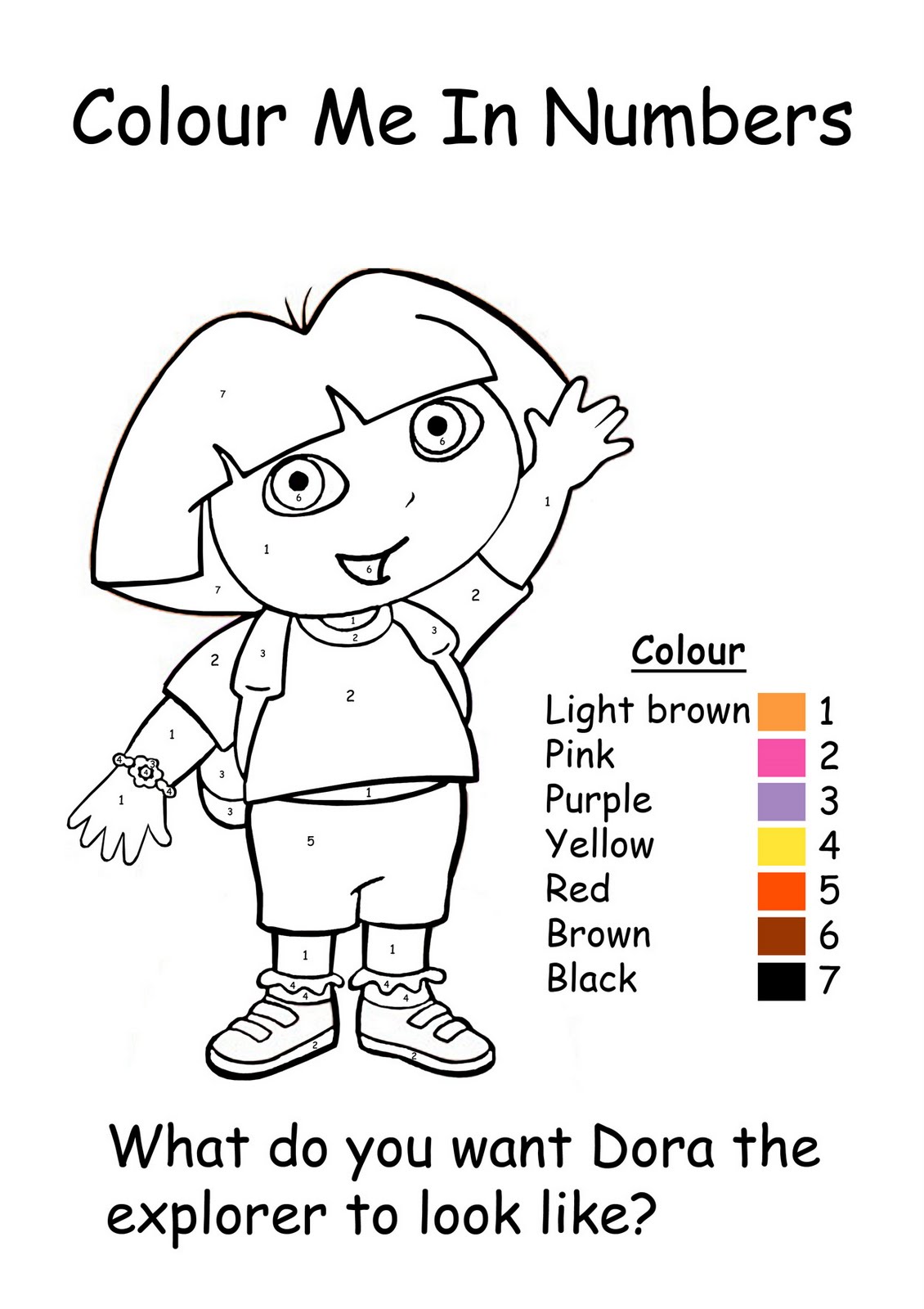
With the main intention to analyse how children work with colour and shapes, a colouring activity sheet was designed. Four well-known Television characters were chosen that would appeal to both boys and girls. The main intention for this artefact was to see how children with different literacy levels worked with colour and shapes not just on the computer but off the computer. Testing both methods allowed me to analyse how children reacted when having to ‘colour’ in different techniques.

Overall the to both methods were the same with all groups. The children appeared more enthusiastic when having the opportunity to work on a computer however after five minutes the participants turned their main attention to the colouring activity off the computer. The majority of the higher-level pupils focused more on following the colour key, it was noticeable that the lower the level the less interested they were to follow the instructions.

This outcome showed that the children with the higher-level skills had more focus to stick to the instructions, although struggling with the activity they continued to pursue the test. Knowing that their skills are higher in literacy I will design an online spelling test. The test will be to see how well their performance is when typing/spelling with computer technology.

Saturday, 10 April 2010

Client Project - User testing


A requirement for the evaluation was to conduct user testing on the final product. My aim for this survey was to check that I stuck to the client brief and provided a website that would appeal to the target audience and would provide information for both members and non-members.

Eight questions were put together that I would hope give me the answers that I needed to conclude my evaluation.

1) Do you think the overall design relates to the current leaflet design?
Everyone agreed that the website related to the leaflet design. Looking back at previous posts you can see the background in all of the website images have the same background. This was taken from the leaflet design and I think this is why people relate it to the leaflet design.

2) On the scale of 1 to 5 (5 being the highest) which elements do you think are important to have on the website?
Choices were: About us, Gallery, Timetable, Uniform, Party info, Competitions, Shows, Contact
For this question I was trying to see whether the members and non-members would find certain pages more important. To my surprise the majority of the testers thought all of the pages had some importance. The 'party info' page was the least popular, which was expected because this is mainly aimed at parents wanting to throw parties for their children.
I was not expecting for non-members to have an interest in the competition pages however I was wrong.

3) Which page did you find most appealing?
As intended the 'gallery' page was the most appealing to he users although some users preferred the larger gallery on the uniforms page. I could understand this as this was something that I wanted on the gallery page however the gallery limited you to the amount of pictures allowed per album. I was surprised that some users also found the homepage the most appealing, perhaps because it is the first page that you come across.

4)Do you think that the site appeals to current members, people wishing to join the club or both?
Every user apart from one selected the answer 'both' this was what I intended when starting the project, I did not want the site to be just for potential new members but for current members, hence why the gallery and competition pages are important.

5) On the scale of 1 to 5 how easy was the navigation?
Another issue when I browsed other dancing websites was that the navigation was at times quite confusing however my results showed that my menu was clear and easy to navigate through. The aim of the site was to have a minimal looking menu with a drop down to provide extra pages.

6) Were all of the pages clearly labelled?
Nearing the end of the project it occurred to me that there were no titles on the pages. This was noted and changed making it now all clear to the audience which page they were on.

7) Can you think of anything else that could be included on the website?
When asking suggestions for extra elements I received some useful feedback. Some people suggest music/video, this was something which myself and Jess discussed however we decided to leave it until there was some actual footage to put on the site. A few users also suggested having a feedback/comments page, like said in previous posts this was tried but could not be achieved although we are adding an announcements page so Jess can write updates for Street Beatz.

8)Are there improvements that you could suggest to make the website more appealing?
The one improvement that was suggested was to tone down the red on the people, some people found that they blended into the background too much, which I agree with.


The user testing has been very beneficial and has clearly shown that I have fulfilled the client brief and so I am very happy with the outcome.

Monday, 5 April 2010

PRP - Sixth artefact, designing the activity sheets


Like I said in my previous post I decided to create a activities which involved the children to colour in a character, one on the computer and one using pencils. Having selected four images from google I edited the pictures on Photoshop taking all of the colour out and creating a simple activity sheet.

However looking at the page I thought that there was something missing, with the help of some family it was suggested that the pictures were made into a colour in numbers activities sheet. The aim of the activity would be for the child to colour in the each part of the activity sheet according to the number colour key provided. Doing this adds some more activity to the sheet and will test to see whether the children will link the colour key to the image.


When the test is handed out I do not want to tell the children what to do. I want to see how they react to the test. If they ask for assistance I will help them, but I do not want to force them into colouring the picture with the correct colours, if they want it to be different then I will let them, if they want the picture to follow the key then I will let them. I want this test to be a fun activity for them.

Like the previous test I think that having the children tested at their level of literacy skills because the previous test showed that the children with higher literacy skills had slower timings on the games. This artefact will be testing activities both on and off the computer so maybe will highlight the more creative children who may not have the higher literacy levels but stronger creative flair.